December 21, 2022

Sudden issue in my Ford EcoSport
Sudden Issue in my Ford Ecosport

I have been using Ford EcoSport as my primary car for past several years and have been meeting my daily commuting needs reliably. One fine day when I was about to take my car to drop my kid to her school, I was shell shocked as my car had flashed some serious error message in the infotainment screen and had engine light flashing in the dashboard. Initially I had assumed it as incorrect error message due to battery drain and had restarted my car to check if there was error message again. After restarting multiple times, I had found out following issues in my Ford EcoSport

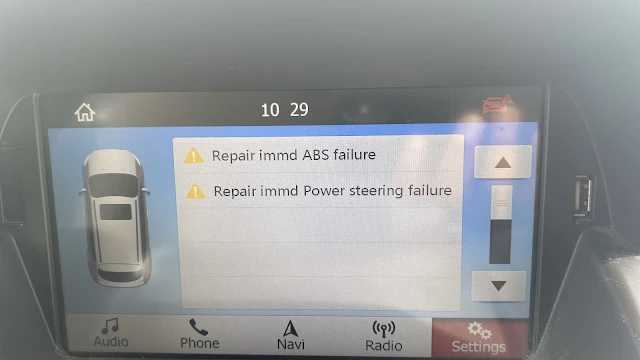
  • ABS & power steering Failure Error message: Post restarting several times, I had to figure out the source error message and had carefully identified the message displayed in the infotainment screen. The message read “Repair immediately ABS failure and Repaid immediately Power Steering failure”. I was completely heartbroken after identifying the source error message notification and the light notification in the engine dashboard had confirmed the same.
  • Steering Wheel became hard to move: Post identification of the error message in the infotainment of the car, I wanted to move the car a little bit to identify any issues while driving or the notification was due to some battery drain issue. While moving the car a little bit, I was able to confirm the issue in my car even further, as the steering had become completely hard to move and the engine dashboard light was ON & alerting not to move the car with current failure messages.

Post confirming the above issues in my car, I was completely heartbroken and had to take few minutes off to get into terms of the situation about my car. To know more about what happened to my car and resolution of the issue, please feel free to check out the articles published in “G R Team Sites”
Keep reading

October 7, 2022

Buying a Used M1 Pro MacBook Pro: What to Check

Positive things to know while buying M1 Pro laptops in late 2022

Updated September 2026: in late 2022, as M2 Pro chips approached, M1 Pro MacBook Pro models were being discounted heavily, and I argued they were better value than the M2 MacBook Air. I have rewritten it as a guide to buying an M1 Pro MacBook Pro second-hand or refurbished.

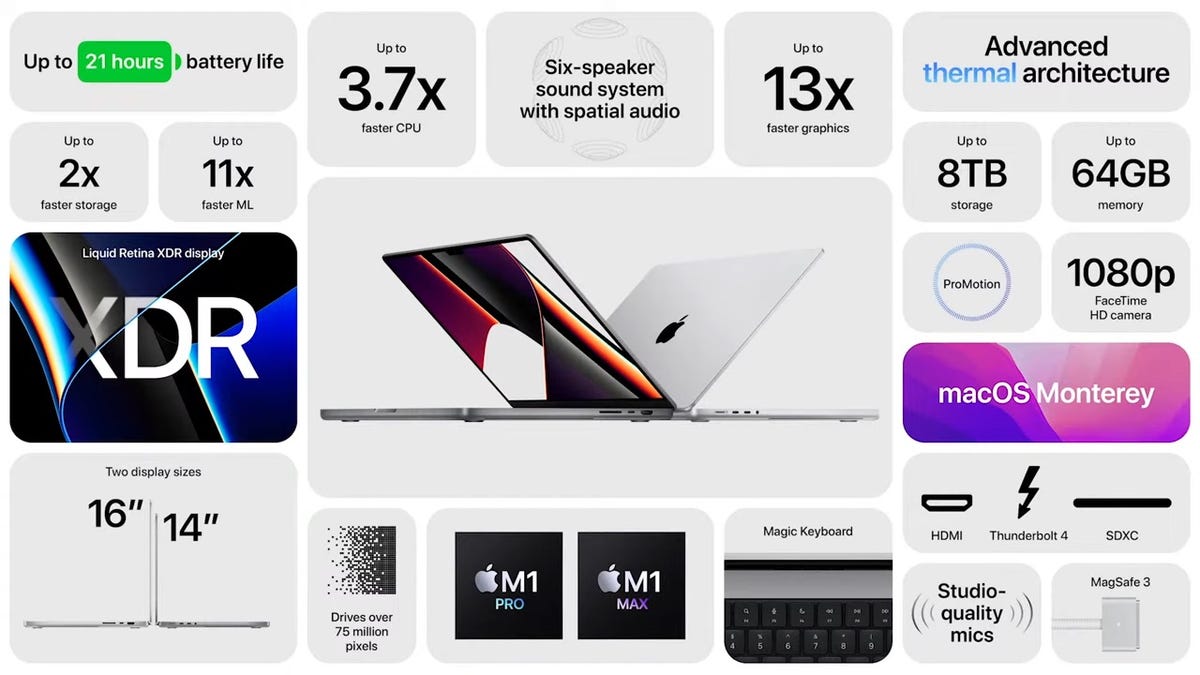
With the M2 Pro announcement expected, the M1 Pro MacBook Pro was widely available with large discounts. At the time I saw offers of around 400 US dollars off, bringing the 14-inch model to about 1,599 dollars. That made it look better value than the new M2 MacBook Air, with stronger performance, a 120Hz ProMotion mini-LED display, and 16 GB of memory with 512 GB of storage in the base model. I expected that configuration to keep it supported for years.

Why is the M1 Pro still a good laptop?

The 14-inch and 16-inch M1 Pro models brought the features that later MacBook Pros kept: the mini-LED display, HDMI, an SD card slot, MagSafe and a full-size function key row. Performance remains strong for photo and video editing and development work.

How does it compare with a newer MacBook Air?

A newer Air can match or beat it on single-core speed and is lighter. The M1 Pro still offers a better display, more ports, fans for sustained workloads and often more memory for the price. Choose based on which of those you need.

What should you check before buying used?

  • Battery condition and cycle count in System Settings.
  • Display for marks, bright spots or blooming on dark screens.
  • Configuration: memory and storage, since neither can be upgraded.
  • Activation Lock: the seller must remove it from their Apple ID and Find My.
  • Ports and keyboard, tested with your own devices.

How long will it get macOS updates?

Apple does not publish end dates. M1-series Macs have been supported for several years so far, but a newer chip will likely be supported longer. Check the current macOS compatibility list.

Is refurbished better than a private sale?

Refurbished from Apple or a reputable seller costs more but includes a warranty and a checked battery. A private sale can be cheaper, but inspect the laptop in person and meet somewhere safe.

Keep reading

September 8, 2022

Why I Bought Memory Foam Tips for My AirPods Pro

 Convincing reasons to buy memory foam tips for my AirPods ProAs I had detailed in my earlier article about the ear tip issue in my right side AirPods pro and often had to re-align in my ear to get ‘Good Seal’ outcome during Apple’s in-built ear tip test. While I was checking out internet about the possible solution for my AirPods pro re-alignment issue, most experts were of opinion to try out for memory foam tips and few users noticed that memory foam tips solved their AirPods pro fitment issues. Following pointers were convincing enough for me to buy memory foam tips to resolve my AirPods pro issues.

  • Better fitment in the ears: Most users were suggesting that the memory foam ear tip had better fitment than the original Apple silicone ear tips and were also of opinion that, since memory foam would adjust itself based on the ear size. Since, the ear size varies from people to people, the memory foam ear tip option was convincing enough for me and I had opinion that my ear size was different, which impacted Apple’s silicone ear tip seal.
  • Enhanced Bass in memory foam ear tips: The users who bought memory foam ear tips were of opinion that the memory foam ear tip had better bass than the Apple’s silicon ear tip. Since, I was able to notice bass loss while watching Dolby Atmos supported movies in OTT platform, I was convinced that opting for memory foam ear tip would solve both bass loss issue and fitment or Good Seal issue in my ear.

The above listed pointers may be convincing enough for the readers to opt for the memory foam ear tips over Apple’s silicone ear tips, however opting for memory foam ear tips did not solve my issues and it got even worse. To know more about my experience with memory foam ear tip in AirPods Pro, please feel free to check out the articles published in “G R Team Sites.”

Keep reading

August 5, 2022

Apple Pencil 1st Generation: My Discontinuation Call

Apple Pencil 1st Generation will be ceased in 2022

Updated September 2026: in 2022 I predicted Apple would discontinue the first-generation Apple Pencil soon, because it had not been updated in years and seemed to be supported only by the 9th-generation iPad, while iPads were moving to USB-C. I have rewritten it to show what happened and how to pick the right Pencil.

The first-generation Apple Pencil had been on sale for years without new features. I expected Apple to discontinue it. My reasoning was that the only current iPad it supported was the 9th generation, so making it for one product would not be worth the cost, and that iPads were all moving to USB-C, which would leave its Lightning connector behind.

Was the first-generation Pencil discontinued in 2022?

No. When Apple launched the 10th-generation iPad with USB-C in October 2022, it supported the first-generation Pencil through a USB-C to Apple Pencil adapter, and Apple began including that adapter with the Pencil. It stayed on sale well beyond my prediction.

Was I right about USB-C?

Yes. In 2023 Apple introduced an Apple Pencil with a USB-C port, and the iPad range continued its move to USB-C.

Which iPads work with the first-generation Pencil?

More than I suggested. Besides the 9th generation, several older iPads support it, including earlier standard iPads, some iPad mini and iPad Air models, and early iPad Pro models. Apple lists compatibility on its website, and that is the place to check.

How do you choose the right Apple Pencil?

  • Start with your iPad model, found in Settings, General, About.
  • Check Apple's compatibility list for that model.
  • Consider pressure sensitivity, which matters for drawing but less for notes.
  • Check charging: some Pencils charge magnetically, others by cable or adapter.

Is a third-party stylus good enough?

For note-taking and navigation, many are fine and cheaper. For drawing, Apple's Pencils usually offer better pressure and palm rejection.

What does this say about predicting Apple?

Apple often keeps older accessories alive with adapters to support older and budget devices. Discontinuation usually comes later than logic suggests.

Keep reading