31 July 2023

Data Backup & Recovery: Unleashing OneDrive's Full Potential

As technology enthusiasts, we are increasingly aware of the need for robust data backup & recovery solutions to safeguard our digital assets. Microsoft, a trailblazer in cloud storage services, offers OneDrive as an all-encompassing platform to store and manage our files securely. However, some users are concerned about the limited version history retention in OneDrive

Limitations of OneDrive's Version History
  • 30 Days Version History Constraint: OneDrive's current version history system allows users to recover previous versions of a document for up to 30 days. While this may be sufficient for some, it falls short for those who require an extended archival period for critical files or sensitive information. Users often wish to have the flexibility to tailor the version history retention based on their specific needs.
  • Customization Options: The Missing Piece: OneDrive users currently lack the ability to modify the preferences for version history based on their usage patterns or document requirements. The absence of customization options limits the adaptability of the platform, leaving users with a fixed 30-day retention period, irrespective of their individual data management needs.
Path to an Enhanced Data Recovery Mechanism
  • Extending Version History: To address the concerns raised by users, Microsoft should consider extending the version history retention period. By allowing users to retain previous versions of their documents beyond the existing 30-day limit, OneDrive can offer enhanced data protection and recovery capabilities.
  • Customization for User Flexibility: Empowering users with customization options is crucial for optimizing data management. By providing users the ability to tailor the version history preferences based on their requirements, Microsoft can enhance the user experience and cater to a diverse range of needs.

Conclusion  

Data backup & recovery is an indispensable aspect of our digital lives, and Microsoft OneDrive plays a significant role in safeguarding our precious files. By acknowledging user concerns and implementing an efficient mechanism for version history retention, Microsoft can elevate the user experience and reinforce its position as a leading cloud storage service provider.

In conclusion, as technology enthusiasts, we recognize the value of our data and the importance of having a robust data backup & recovery solution. Microsoft OneDrive, with its extensive offerings, can further enhance its capabilities by extending the version history retention period and allowing user customization. By doing so, Microsoft can continue to deliver an exceptional user experience and maintain its position as a trailblazer in cloud storage services.

7 June 2023

2012 MacBook Pro: The Journey and Untimely Demise

2012 MacBook Pro: The Journey and Untimely Demise
They say that time flies when you're having fun, but in the case of my trusty 2012 MacBook Pro, it felt like time stood still. For a good seven years, this loyal companion had been by my side through thick and thin, faithfully aiding me in all my digital endeavors. But alas, as with all good things, its time eventually came to an end. In this blog post, I'll take you through my journey with this remarkable machine, culminating in its untimely demise due to RAM slot issues that called for a complete motherboard replacement. Join me as I share my experiences and the difficult decision I faced: to repair or to replace?

The Water Incident - A Brush with Disaster
  • A Sticky Situation: Picture this - it was a typical day, just like any other, until my daughter decided to make a surprise visit to my home office. Innocently enough, she placed a glass of water on the desk, within arm's reach of my beloved MacBook Pro. You can probably guess what happened next. One misjudged movement, and disaster struck. The glass tipped over, spilling its contents perilously close to my laptop. Panic set in as I rushed to save my faithful machine from an untimely demise.
  • The Aftermath: I managed somehow to prevent the water from directly splashing onto the MacBook Pro's keyboard. However, a small but significant amount had managed to seep through the ventilation slots, causing concern. However, it wasn't long before the consequences of the water incident started to rear their ugly head.
A Tale of Repair and Resilience
  • The First Motherboard Replacement: As days turned into weeks, I noticed peculiar behavior from my once trusty companion. Random crashes, sluggish performance, and intermittent screen flickering became a part of my daily routine. It became clear that the water had caused damage that could not be ignored. Reluctantly, I took my MacBook Pro to third party service center, where they diagnosed the issue: a faulty motherboard.
  • The Costly Decision: After weighing the pros and cons in early 2016, I decided to go ahead with the repair. After all, the MacBook Pro had served me well, and I believed it had more life left in it. The repair was completed, and my trust in my resilient machine was reaffirmed.
  • The Final Blow: RAM Slot Issues: Fast forward to mid-May 2023. Once again, RAM slot issues reared their ugly head, rendering my beloved machine unresponsive and unwilling to start. This time, however, the prognosis was grim. The only solution was a complete motherboard replacement, a costly affair that left me at a crossroads.
The Difficult Decision: To Repair or to Replace?
  • Weighing the Options: The prospect of investing in yet another motherboard replacement was daunting. While my 2012 MacBook Pro had served me well over the years, I had to consider the inevitable march of technology. The advancements made since its release had resulted in sleeker, faster, and more capable machines.
  • Embracing the Future: The Purchase of a New MacBook Pro - After much contemplation, I made the difficult decision to bid farewell to my 2012 MacBook Pro and embrace the future. I knew that in order to keep up with the ever-evolving demands of modern computing, a new MacBook Pro was the logical choice. This time, I aimed to future-proof my purchase, ensuring that it would last me for the next six to seven years. It was an investment in productivity, creativity, and the seamless integration of technology into my life.
Final thoughts
From surviving a water incident to enduring a motherboard replacement, it had proven its resilience time and time again. However, all good things must come to an end, and the laptop's RAM slot issues ultimately sealed its fate. It was a difficult decision, but I chose to embrace the future by purchasing a new MacBook Pro, one that would carry me through the next chapter of my digital adventures. Farewell, old friend, and welcome, new companion.

24 May 2023

14-inch M1 Pro: Worries of Maintaining Clean Display

14-inch M1 Pro: Worries of Maintaining Clean Display

After the excitement of purchasing the new 14-inch M1 Pro MacBook Pro settled in, I couldn't help but start worrying about the challenges of keeping the display clean and free from dust and fingerprints. With its exceptional display quality, the MacBook tends to attract dust easily, and any accidental touch can leave unsightly fingerprints that impact the viewing experience. In this article, I will address these concerns and provide solutions for maintaining a clean and pristine display.
  • Worries of Maintaining a Clean MacBook Display: The moment I unboxed my new 14-inch M1 Pro MacBook Pro, the stunning display immediately caught my attention. The vibrant colors, sharp details, and impressive resolution were a visual delight. However, with such a remarkable display, the worries of dust and fingerprints became apparent.
  • Challenge of Dust: Dust seems to have a magnetic attraction to the MacBook display. It settles on the screen, creating tiny specks that are not only distracting but can also affect the clarity and overall viewing experience. The challenge lies in finding effective ways to keep the display dust-free without causing any damage.
  • Dealing with Fingerprints: Another concern that arises with the MacBook display is fingerprints. Accidental touches or even the natural oils from our fingers can leave smudges and marks on the screen. These fingerprints not only detract from the aesthetic appeal but also create a barrier between us and the crisp images that the display can offer.
  • Impact on Viewing Experience: Dust and fingerprints on the MacBook display can significantly impact the viewing experience. They create distractions, making it difficult to fully immerse ourselves in the content on the screen. Whether we are watching movies, editing photos, or simply browsing the web, a clean and clear display is essential for an optimal viewing experience.


Solutions for Keeping the Display Clean

Fortunately, there are several solutions available to maintain a clean MacBook display and mitigate the worries associated with dust and fingerprints. By implementing these strategies, we can ensure that our viewing experience remains uninterrupted and enjoyable.

  • Using Microfiber Cloths: One effective method for cleaning the MacBook display is to use microfiber cloths. These soft and gentle cloths are specifically designed to pick up dust particles and remove fingerprints without scratching or damaging the screen. By gently wiping the display with a microfiber cloth, we can quickly eliminate dust and restore clarity.
  • Avoiding Harsh Chemicals: When cleaning the MacBook display, it's crucial to avoid using harsh chemicals or abrasive cleaners. These substances can damage the screen's protective coating and cause permanent marks or discoloration. Instead, opt for screen-safe cleaning solutions or simply use distilled water dampened on the microfiber cloth for gentle cleaning.
  • Utilizing Screen Protectors: Another preventive measure to consider is using a screen protector. Screen protectors not only provide an extra layer of protection against scratches but also make it easier to clean the display. They act as a barrier between our fingers and the screen, reducing the likelihood of leaving fingerprints behind.

While the worries of maintaining a clean MacBook display are understandable, there are effective solutions available to address them. By incorporating regular cleaning routines, utilizing microfiber cloths, and embracing prevention measures, we can ensure a clear and pristine viewing experience. A clean display not only enhances the visual appeal of the MacBook but also contributes to its longevity and overall performance. With these strategies in place, we can fully enjoy the remarkable display of the 14-inch M1 Pro MacBook Pro.

Frequently Asked Questions

  1.  Can I use any cloth to clean the MacBook display? It is best to use a microfiber cloth specifically designed for cleaning screens. These cloths are gentle and do not scratch the display while effectively removing dust and fingerprints.
  2. Can I use water to clean the MacBook display? Distilled water can be used sparingly on a microfiber cloth to clean the display. However, avoid using excessive water or any cleaning solutions that are not specifically designed for screen cleaning.
  3. Will using a screen protector affect the display quality? High-quality screen protectors are designed to maintain the display's clarity and touch sensitivity. When applied correctly, they should not significantly impact the viewing experience.
  4. How often should I clean the MacBook display? It is recommended to clean the display at least once a week to prevent dust and fingerprints from accumulating. Adjust the frequency based on your usage and environmental conditions.
  5. Can dust and fingerprints cause permanent damage to the MacBook display? While occasional dust and fingerprints are unlikely to cause permanent damage, neglecting regular cleaning can lead to accumulation and potential long-term effects. It's best to address them promptly to maintain the display's quality.

28 April 2023

Debunking the Apple Pencil vs. Third-Party Options Dilemma for iPad Users

Apple Pencil vs. Third-Party Options

In today's digital world, iPads have become powerful tools for creative professionals, students, and artists alike. The ability to draw, write, and take notes directly on the screen has revolutionized the way we work and express ourselves. And a stylus, like the Apple Pencil, can further enhance this experience. But is it really necessary to invest in the Apple Pencil, or are there affordable third-party options that can serve the same purpose? Let's dive deeper into this dilemma and weigh the pros and cons of each option.

Overview of Apple Pencil:
Apple Pencil is a sleek and sophisticated stylus designed exclusively by Apple for enhanced usage with iPads. It offers a seamless and responsive drawing and writing experience, with high precision and low latency. Additionally it also supports pressure sensitivity, tilt, and palm rejection, making it ideal for professional artists, graphic designers, and content creators. 

Advantages of Apple Pencil:

  • Unmatched Precision and Responsiveness: The Apple Pencil's advanced technology provides unparalleled precision and responsiveness, making it ideal for detailed artwork, precise note-taking, and professional use.
  • Seamless Integration with iPad: Being an official Apple accessory, the Apple Pencil is seamlessly integrated with iPads, offering a seamless and lag-free experience. It also supports features like tilt and pressure sensitivity, which can enhance your creativity.
  • High-Quality Build and Design: The Apple Pencil boasts a premium build quality with a sleek and minimalist design. It feels great in hand and is durable, ensuring a long-lasting investment.
  • Wide Range of Compatible Apps: The Apple Pencil is supported by a wide range of apps in the App Store, including popular drawing and note-taking apps like Procreate, Adobe Photoshop, Notability, and Good Notes.

Disadvantages of Apple Pencil:

  • High Cost: The biggest drawback of the Apple Pencil is its price. The Apple Pencil can be significantly more expensive compared to third-party pencil options, making it a hefty investment, especially for budget-conscious users.
  • Limited Compatibility: The Apple Pencil is only compatible with select iPad models, such as the iPad Pro, iPad Air, and iPad mini. If you have an older iPad model or a different tablet, the Apple Pencil may not be an option for you.
  • Lack of Customization: While the Apple Pencil offers a seamless experience with iPads, it may lack the customization options that some third-party pencil options provide. For example, some third-party pencils may offer customizable buttons or different nib options to suit your preferences.

Overview of Third-Party Pencil Options:
In addition to the Apple Pencil, there are several third-party pencil options available in the market that are compatible with iPads. These pencils are typically more affordable than the Apple Pencil and offer a range of features and functionalities that can cater to different needs and preferences. 

Advantages of Third-Party Pencil Options:

  • Affordability: One of the biggest advantages of third-party pencil options is their affordability. These pencils are often priced lower than the Apple Pencil, making them a more budget-friendly option for users who may not want to splurge on an expensive stylus.
  • Wide Compatibility: Unlike the Apple Pencil, which is limited to select iPad models, third-party pencil options are often designed to be compatible with a wider range of iPad models. This means that you may have more options if you own an older iPad model or a different tablet.
  • Customization Options: Some third-party pencils come with customizable buttons, allowing you to assign different functions or shortcuts to them. This can enhance your productivity and streamline your workflow.
  • Variety of Nib Options: Third-party pencil options may also offer different nib options, such as fine, medium, or broad tips, allowing you to choose a nib that suits your drawing or writing style.
  • Unique Design and Features: Some third-party pencil options may offer unique design elements or features that set them apart from the Apple Pencil. For example, some pencils may have a different grip, color options, or additional features like eraser functionality.


Disadvantages of Third-Party Pencil Options:

  • Varied Quality: The quality of third-party pencil options may vary greatly, as they are not regulated by Apple's strict quality standards. Some pencils may not be as durable or reliable as the Apple Pencil, leading to a potentially shorter lifespan or inconsistent performance.
  • Limited App Compatibility: While many third-party pencils are compatible with popular drawing and note-taking apps, they may not offer the same seamless integration and features as the Apple Pencil. This can impact the overall user experience and functionality.
  • Less Brand Recognition: Third-party pencil options may not have the same level of brand recognition or reputation as the Apple Pencil. This can make it challenging to determine the quality and reliability of the product, as there may be limited customer reviews or feedback available.

Factors to Consider:
When deciding whether to invest in the Apple Pencil or opt for an affordable third-party pencil option, there are several factors to consider:

  • Budget: If budget is a significant consideration for you, a third-party pencil option may be a more cost-effective choice.
  • iPad Model: The compatibility of the stylus with your specific iPad model is crucial. If you own an iPad model that is not supported by the Apple Pencil, a third-party option may be your only choice.
  • Intended Use: Consider how you plan to use the stylus. If you are a professional artist or content creator and require advanced features like pressure sensitivity and tilt, the Apple Pencil may be a better fit. However, if you need a stylus for basic note-taking or occasional drawing, a third-party pencil option may suffice.
  • Personal Preferences: Think about your personal preferences in terms of design, customization options, and nib choices. If you value these aspects, a third-party pencil option may offer more variety and options.
  • Quality and Reliability: Consider the quality and reliability of the stylus. Research customer reviews, check for warranty information, and assess the overall reputation of the brand before making a decision.

Conclusion:
In conclusion, the decision to invest in the Apple Pencil or opt for an affordable third-party pencil option ultimately depends on your budget, iPad model, intended use, personal preferences, and the importance of quality and reliability. The Apple Pencil offers seamless integration with iPad, advanced features, and a trusted brand reputation, but it comes with a higher price tag. On the other hand, third-party pencil options may be more affordable, offer wider compatibility, customization options, and unique features, but the quality and reliability may vary.

It's important to thoroughly research and consider all factors before making a decision. Read customer reviews, compare specifications, and assess your specific needs and budget. If possible, try out different options in person or seek recommendations from trusted sources. Ultimately, the best stylus for you will depend on your individual preferences, requirements, and budget.  To read more such articles, please feel free to check out "G R Team Sites"

22 March 2023

Is it Time for Apple to Launch its Own Search Engine?

Is it Time for Apple to Launch its Own Search Engine?
The introduction of Chat-GPT has reshaped the search engine industry, creating a perfect opportunity for Apple to launch its search engine platform. Search engine industry is due for a major reshuffle with the advent of Chat-GPT, leading people to find exact solution or opinion and to explore alternatives to Google’s dominant search. Now it’s a perfect time for Apple to capitalize on this shift and launch its own search engine platform, which could incorporate the advanced features of Siri and other technologies.
  • Need for an Alternative Search Engine : For many years, Google has been the dominant player in the search engine market, but the emergence of Bing by incorporating few features from Chat-GPT and other search engines exploring option to incorporate similar enhancements has begun to challenge its supremacy. With Chat-GPT's introduction, people are seeking more from their search engines, and Google may no longer be able to meet their expectations.
  • Opportunity to incorporate Siri's Capabilities: Siri, with its advanced natural language processing abilities, could be one of the Apple's most significant differentiators in the search engine space. The NLP features could be integrated into a new search engine platform, providing users with more precise and relevant search results.
  • Incorporating Apple device dominance: Despite the challenges, there are also several potential benefits to Apple launching its search engine platform. Apple is renowned for its user experience focus, and a new search engine could provide users with a more personalized and superior experience. Apple too has the potential to join the client input from Apple's gadgets and administrations, such as Apple Maps and Apple Music, it may make a more comprehensive look encounter.
By incorporating Siri's features and other advanced technologies, Apple could create a search engine that fulfills the needs of modern users. To read more such articles, please feel free to check out the articles published in “G R Team Sites”

3 February 2023

Challenges of Returning to the Office After Remote Work

Returning to Office

The COVID-19 pandemic has forced many businesses and employees to embrace remote work, but with vaccination rates increasing and restrictions easing, many companies are now making plans to return to the office. However, this transition back to a traditional work routine is not without its challenges, particularly in terms of travel stress and adjusting to new routines. Following is my opinion on the challenges of returning to office and how it impacts employees


Unwanted Travel Stress
For many employees, the transition back to the office means a return to their pre-pandemic commute. This can be a source of stress, particularly for those who have become accustomed to the flexibility and reduced travel time due to remote work.

Frustration in Adopting to a New Work Routine
Going from a flexible, remote work environment to a more structured, in-person office environment can be challenging for employees. Employees often find difficult to adjust to new routines, such as adhering to a strict schedule, dressing appropriately for the office, and travel routine to office.

Balancing Work and Personal Life
The transition back to the office also means a return to a traditional work-life balance, it is a radical shift for employees who have become accustomed to the flexibility of remote work and often find it difficult to spend time with family or children.

Maintaining the Benefits of Remote Work
While the return to the office offers many benefits, such as increased collaboration and face-to-face interaction, it is important to remember the benefits of remote work, such as reduced commute time and increased flexibility. Companies can maintain these benefits by allowing employees to continue to telecommute on a part-time basis, or by offering flexible scheduling options.

My final thoughts
The transition back to the office after remote work can be challenging, but by addressing the challenges of unwanted travel stress, frustration in adopting to a new work routine, and balancing work and personal life. By maintaining remote work for employees, such as flexibility and reduced commute time, businesses can ensure a happy and productive workforce. Check out "G R Team Sites" for more such articles.

21 December 2022

Sudden issue in my Ford EcoSport

Sudden Issue in my Ford Ecosport

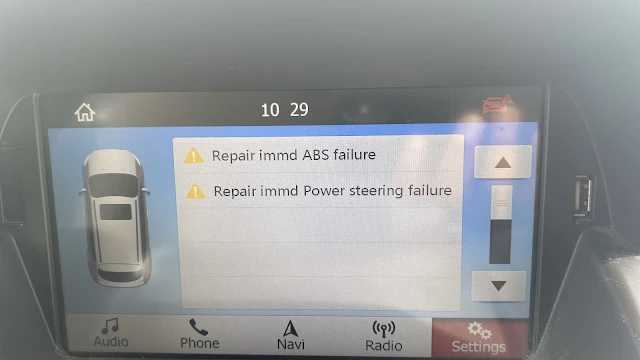
I have been using Ford EcoSport as my primary car for past several years and have been meeting my daily commuting needs reliably. One fine day when I was about to take my car to drop my kid to her school, I was shell shocked as my car had flashed some serious error message in the infotainment screen and had engine light flashing in the dashboard. Initially I had assumed it as incorrect error message due to battery drain and had restarted my car to check if there was error message again. After restarting multiple times, I had found out following issues in my Ford EcoSport

  • ABS & power steering Failure Error message: Post restarting several times, I had to figure out the source error message and had carefully identified the message displayed in the infotainment screen. The message read “Repair immediately ABS failure and Repaid immediately Power Steering failure”. I was completely heartbroken after identifying the source error message notification and the light notification in the engine dashboard had confirmed the same.
  • Steering Wheel became hard to move: Post identification of the error message in the infotainment of the car, I wanted to move the car a little bit to identify any issues while driving or the notification was due to some battery drain issue. While moving the car a little bit, I was able to confirm the issue in my car even further, as the steering had become completely hard to move and the engine dashboard light was ON & alerting not to move the car with current failure messages.

Post confirming the above issues in my car, I was completely heartbroken and had to take few minutes off to get into terms of the situation about my car. To know more about what happened to my car and resolution of the issue, please feel free to check out the articles published in “G R Team Sites”

7 October 2022

Positive things to know while buying M1 Pro laptops in late 2022

Positive things to know while buying M1 Pro laptops in late 2022With the new M2 Pro chip announcement is round the corner, the M1 Pro chip is flooded with exciting offers of hefty discounts and immediate availability. All the offers and discounts make it even more exciting to get M1 Pro MacBook Pro over the latest version of M2 MacBook Air and hefty price tag has also made even more desirable. However, following are my reasons on why buying M1 pro is more perfect than ever before.

  • Affordability and superior performance: The hefty discounts of $400 on all versions of M1 Pro has made it more value for money than any other versions of MacBooks and with $1599 price tag the performance is also superior to upgraded version of M2 MacBook Air.
  • Excellent Mini LED display and higher configuration: In addition to affordability with hefty discounts, the other reason on why getting the M1 Pro version makes sense is that the M1 Pro MacBook comes with advanced Pro-Motion display of 120Hz and with 16GB RAM/512GB SSD configurations. The superior configuration with the latest mini-LED display ensures that you are covered on getting software updates and new features for next several years.
Hope the above reasons are helpful for your on deciding on why buying M1 Pro MacBook makes much sense than any other version of entry level M1 or M2 MacBooks. For more such information and articles, please feel free to check out the “G R Team Sites”

8 September 2022

Convincing reasons to buy memory foam tips for my AirPods Pro

 Convincing reasons to buy memory foam tips for my AirPods ProAs I had detailed in my earlier article about the ear tip issue in my right side AirPods pro and often had to re-align in my ear to get ‘Good Seal’ outcome during Apple’s in-built ear tip test. While I was checking out internet about the possible solution for my AirPods pro re-alignment issue, most experts were of opinion to try out for memory foam tips and few users noticed that memory foam tips solved their AirPods pro fitment issues. Following pointers were convincing enough for me to buy memory foam tips to resolve my AirPods pro issues.

  • Better fitment in the ears: Most users were suggesting that the memory foam ear tip had better fitment than the original Apple silicone ear tips and were also of opinion that, since memory foam would adjust itself based on the ear size. Since, the ear size varies from people to people, the memory foam ear tip option was convincing enough for me and I had opinion that my ear size was different, which impacted Apple’s silicone ear tip seal.
  • Enhanced Bass in memory foam ear tips: The users who bought memory foam ear tips were of opinion that the memory foam ear tip had better bass than the Apple’s silicon ear tip. Since, I was able to notice bass loss while watching Dolby Atmos supported movies in OTT platform, I was convinced that opting for memory foam ear tip would solve both bass loss issue and fitment or Good Seal issue in my ear.

The above listed pointers may be convincing enough for the readers to opt for the memory foam ear tips over Apple’s silicone ear tips, however opting for memory foam ear tips did not solve my issues and it got even worse. To know more about my experience with memory foam ear tip in AirPods Pro, please feel free to check out the articles published in “G R Team Sites.”

5 August 2022

Apple Pencil 1st Generation will be ceased in 2022

 Apple Pencil 1st Generation will be ceased in 2022

Apple Pencil 1st generation have been in the market for past few years and ever since it was launched, it has not been getting further enhancements or new features in the latest launch events. There are couple of reasons why the first-generation Apple pencil might be discontinued and may be moved into Apple’s obsolete products list. Here are my reasons on why Apple Pencil 1st generation might be discontinued:
  • Supported only by one Generation of iPad: As of now, the apple pencil 1st generation has been supported only by one generation of the iPad – the 9th Generation. Which means that, an iPad accessory is in the production only for the support for single product and the long-time production manufacturing with software updates will become more complicated than ever. So, apple might think of discontinuing the product, rather than spending millions in manufacturing and allocating their resources for compliant software updates.
  • Lack of new features: Apple Pencil 1st generation has not got any new features or software enhancement for a long time and with being idle for a long time directly means that the product might get killed sooner than later. With all the iPad models moving to USB-C connectivity, the next generation iPad might also move to USB-C connectivity.
Hope, Apple makes the announcement on the Apple 1st generation discontinuation sooner than later and launches more exciting new product that makes iPad more productive. For more such articles, please feel free to check out the “G R Team Sites”

13 November 2021

My comparison of M2 or M1 MacBook Air or expensive M1 pro


My comparison of M2 or M1 MacBook Air or expensive M1 pro
As I have detailed in my other articles published in "G R Team Sites", I have been using MAC operating system as my primary device for past few years and felt comfortable in using the MacBook. Being in Apple ecosystem for past few years, I have no intention of exiting the ecosystem and have plans to continue for few more years. However, recently my 2012 MacBook Pro had started to give few issues and I am planning to upgrade to the latest version of MacBook’s available. But, with the recent launch of M1 pro, the oscillation of selecting preferred MacBook's have grown higher and following are my observation on each version of MacBook
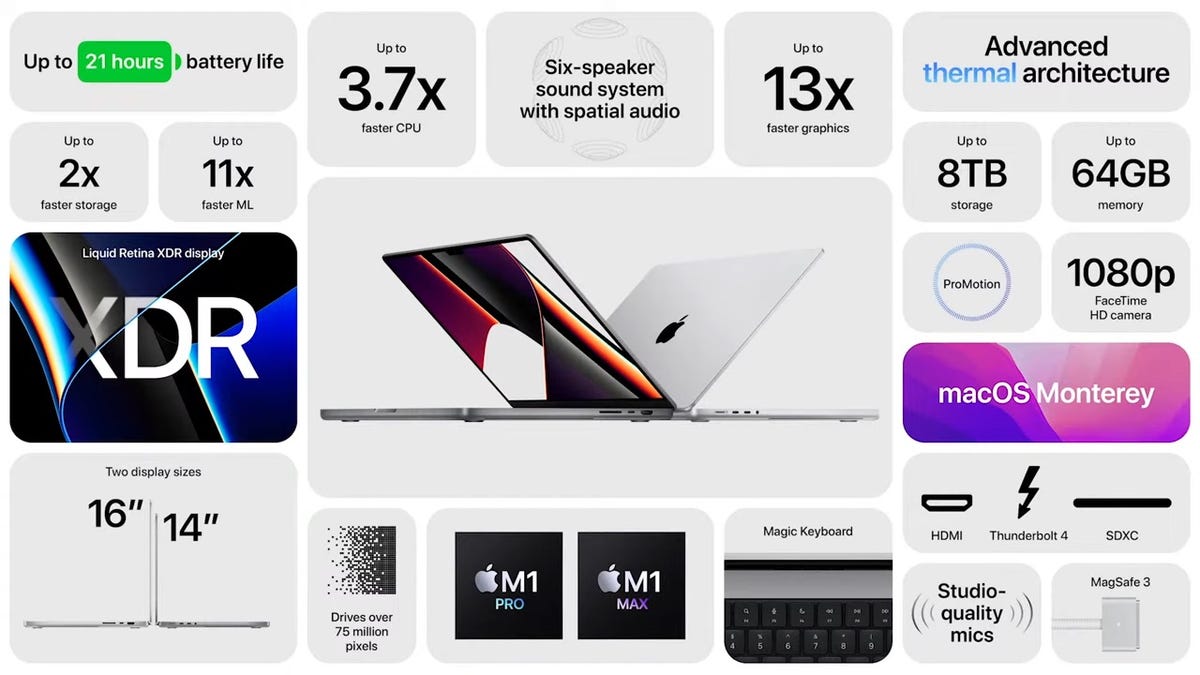
  • M1 Pro launched in 2021: M1 Pro was recently launched, and the processing speeds were exceeding the expectations based on technology experts. However, with new mini-LED screen, M1 processors & notch, the laptop would be future proof for next few years and the pricing was off my budget. 
  • M1 MacBook Pro 2020: MacBook Pro with M1 processor have set new benchmarks with its processing power and the pricing seems to a little way over my budget. However, with specifications seems to be on par with MacBook air and with speculations of touch bar being removed in upcoming versions, opting for the current version seems unpractical. 
  • M1 MacBook Air 2020: This laptop seemed like perfect match for my requirements and was well within my budget. However, with imminent launch of M2 processor and expectations on new benchmarks, investing on older version makes little sense. 
Will reveal further about my decision on MacBook in my upcoming articles.

28 September 2021

Disappointing iPad 9th Generation with lukewarm design and processor

Disappointing iPad 9th Generation with lukewarm design and processor

After much fanfare and leaks from different tech experts, Apple has finally launched iPad 9th generation and I was completely disappointed with the version launched. I have few pointers about the recently launched iPad version and wanted to detail them in this article. Here is the list
  • Boring design with no major updates: iPad 9th generation was released with same old design as 7th & 8th generation iPads with no better display or USB type C support and even did not include support for Pencil 2nd version, while the iPad mini got both design revamp and support for iPad pencil. 
  • Lukewarm processor: Apple has inducted A13 bionic processor into 9th generation iPad and the processor was couple of years old with nominal results when compared to recently launched processors. The processor will anyways have power to handle all day-to-day tasks and will be disappointing for people, who were looking for high processors from this affordable iPad for their work. 
  • Lack of differentiating feature: Other than affordability, the newest iPad 9the generation process does not include any new innovative feature or enhancements for existing users to move from their old iPads to the latest iPads.
Hope, apple does a revamp of iPad's 10th generation like it did for iPad mini or else, the users will stick to their existing old iPads longer than needed, while enjoying all new iPadOS features in their existing devices. For more such articles, please feel free to check out the articles published in "G R Team Sites"

9 August 2021

My view on transfer from Google Photos to OneDrive

It has been few weeks since I switched to OneDrive as my preferring online cloud platform and to back up my mobile photos & videos. Post migration to OneDrive, I had hiccup of extracting my old photos from RAR file exported from Google Photos to OneDrive. However, in this article, I wanted to detail the comparison between Google Photos and OneDrive, focusing only about photos and its features

Google Photos: 

  • Memories: For each day, the app shows different memories happened over years.
  • Uniqueness: At times, even shares some collage photos with similar photos taken earlier
  • Effects: At times, the Google adds cinematic effects or 3D effects to photos

Additionally, Google shares animation effects for group of similar photos or for videos

OneDrive:

  • Memories: Shares only the images/photos taken during same timeline
  • Uniqueness: Saves Photos & videos with source format. Example:Stores live photos as it is
  • Video files are saved in source quality and no compression of file is name
  • Effects: No effects are applied, the file is saved and stored as it is.

For below comparison, taken photo of credit cards and uploaded both files into Google Photos and OneDrive

Google Photos -
Photo Search functionalities

  • Search Term: card(s)Shows up results of only photos with single card
  • Does not show up photos holding multiple cards

Improvements needed

  • Need to allow users to enable option for saving photos or videos in source format
  • Photo search to be improved a little bit compared to OneDrive

OneDrive - Photo Search functionalities

  • Shows up results of photos of all photos having single card or multiple cards.
  • Shows up results on filename having card as well

Improvements needed

  • Need memories function to be improved, so more such photos are shown up
  • Photo Effects option to be enabled
  • While searching, there should have been choice to filter out filetypes like PDF or JPEG files only

For more comparison like above or if you are looking to read more such articles, please feel free to check out the G R Team Sites.

2 July 2021

Modes available to get Treadmill for Home 

As I stated in my earlier article that I was planning to treadmill for my physical fitness and to keep healthy regime, the main concern for me now is to figure out shopping mode. With recent lockdown restrictions and COVID scare, the decision to buy treadmill was dragged even more. However, I will continue to detail the pros and cons of the physical shopping mode. 
  • Physical shopping: Getting treadmill in physical store have been the most widespread practice and most practical options for shoppers who were looking to buy treadmills. Let me get into pros and cons of this choice: 
    • Advantages: 
      • Explore treadmill in physical mode 
      • Validate the running surface to suit your walking and running condition 
      • Check out features directly and learn about the product. 
      • Service and product faulty conditions will be addressed faster and swiftly 
      • Spare parts would be readily available 
    • Disadvantages: 
      • Price is higher than online shopping sites 
      • If the product stock is not available, it would take longer than expected to deliver the product. 
      • With COVID scare, it is uncertain when the shops will open and transportation options available due to restrictions 
      • Most of the advanced treadmills are quoted with exorbitant prices. 
To know more about the pros and cons of online shopping mode available for treadmill, please feel free to checkout the articles published in G R Team Sites.

12 June 2021

Kids mental health is spoiled due to mobile devices

In the earlier post, I was detailing about the disadvantages of giving kids individual mobile phones and how unwanted and unrated advertisements are distracting kids' mental health. In continuation to that post, I wanted to highlight couple of more disadvantages of giving individual mobile phones to kids due to COVID situation. 
  • YouTube videos: During online classes, most students refer learning the terms through YouTube videos, however this reference to YouTube videos make students to browse through unwanted videos and changes their thinking ability through YouTube’s suggested videos algorithms. Those unwanted videos make kids to think unwanted topics and forces them to think in diverse ways. So, it is mandatory for parents to check if their kids are watching only restricted videos and their mind is not distracted with unwanted videos. 
  • Chat apps: During they COVID times, it has become mandatory to install chat apps for getting updates about their classes and get their class notes online. However, these online chat apps have also enabled them to share files easily and to chat or video call with friends instantly. These features may work against kids if chat apps are used in diverse ways and make kids to chat with friends for a long time, making them to get addicted to their phones. 
With above listed disadvantages, giving mobile phones to kids will harm them more, if not monitored properly and being used for unwanted things. For more such posts, please feel free to check out the posts published in G R Team Sites. 

17 May 2021

Why should I get new M1 Macbook Air 2020

For a long time, I was looking to get new MacBook as replacement for my older MacBook Pro due to its slowness and lack of updates or no option to get newer version of operating system. I wanted to get newer M1 MacBook Air for the following reasons.
  • Superior performance: The M1 version was already breaking all benchmark results and the performance far better than earlier versions. 
  • Future-proof for next 5 years: Since newer version of M1 MacBook was launched only at 2020, the next few iterations of software will support the laptop and all the new features will support the laptop at least for 5 years. 
  • Reliability: The reviewers were praising Apple for delivering on what it had promised, and I am sure the reliability of M1 MacBook Air will exceed the reliability expectation levels. 
  • Battery: The last and most impacted feature of the new M1 MacBook Air is the superior and consistent battery performance. If Apple has committed some hours on battery performance, then I am sure it will exceed the expectations with the normal usage. 
To know more about such posts, please feel free to check out the blog posts listed in G R Team Sites.