Android Sideloading Advanced Flow: 24 Hours
Google's June post said "power users" would keep the ability to install apps from unverified developers. Here is what the Android sideloading advanced flow does with that promise: a one-day wait, an identity check, a warning on every install, and one quiet catch. Switch it off, and unregistered apps installed this way stop updating.
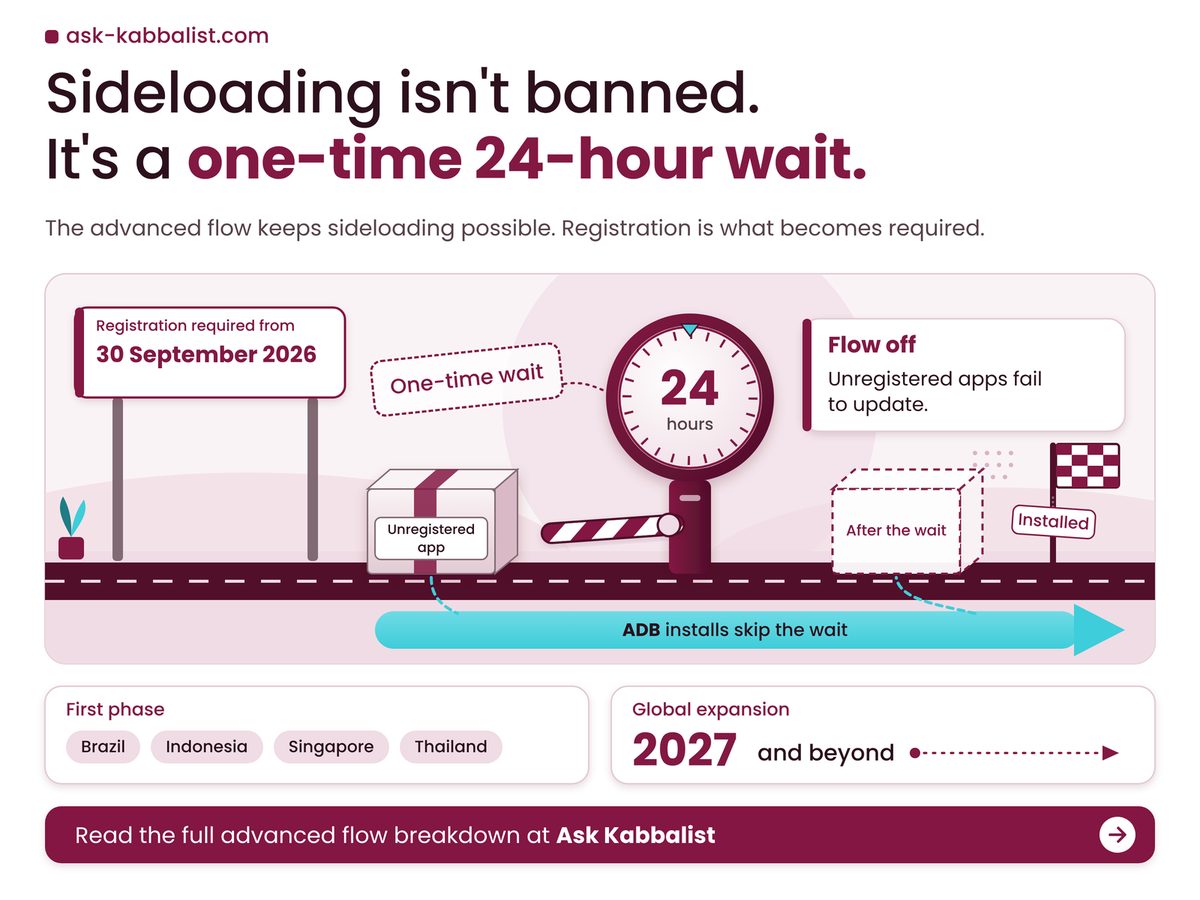
Key Takeaways: the advanced flow is a one-time, one-day wait, not a ban, but you cannot skip it and the apps it unlocks need it kept on.
- Google's FAQ calls the wait one-time and one day, with no skip command yet.
- Enabling it for 7 days is a window: once it lapses, updates to unregistered apps fail.
- Developers using ADB skip the wait; ordinary users do not.
- Google's two pages disagree on which Android versions are covered, so check your phone against both.
Why does the Android sideloading advanced flow matter now?
It matters now because app registration became required on 30 September 2026 for participating stores in Brazil, Indonesia, Singapore and Thailand, and Google says the requirement expands globally in 2027 and beyond.
Today's reach is narrower than the headline. Google's Help page starts in four countries, so a phone in the US or UK sits outside the first phase. Neither Google page says plainly whether a browser-downloaded APK is checked yet. The FAQ says unregistered apps "can only be installed or updated when the advanced flow is enabled or by using ADB". Our reading: that is the direction of travel, not today's rule everywhere.
Google's FAQ confirms a "one-time, one-day wait", a fingerprint, face unlock or PIN check, then a choice to enable it "for 7 days or indefinitely". A warning with an "Install Anyway" button still appears. Digital Trends reported on 19 August 2026 that the switch hides in Developer options and a restart comes first. Call it a checkpoint. No, a waiting room is closer: nothing is blocked, you just cannot enter yet.
Our view: phone makers now change phones through dated, staged rollouts. Google moved Android phones from Assistant to Gemini from 4 September 2026, and Apple's iOS 27 Siri beta ships with daily caps it will not number. The detail that matters tends to sit on a help page, and here it does: the wait length is in the FAQ, not the June post.
Four numbers settle most of this. Three are Google's, as read on 23 October 2026; the fourth is our own count across three Google documents.
Wait Before You Can Confirm
24 hours
Once, with no skip command
Full Distribution Account Fee
$25
Hobbyist accounts skip it
Stores Covered in Phase One
7 stores
Check yours on Google's list
Google Pages Giving the Wait
1 of 3
Derived: two documents stay silent
Take the wait. With no skip command yet, only a promise to "consider this for future versions", it becomes something you arrange ahead, like renewing a passport, not on the day you need it.
A wait you cannot skip is a day's notice you must give yourself, and Google's own Help page never says how long that day is.
Which of these five situations is yours?
Most readers fall into one of five situations, and the sensible move differs for each: a hard deadline, a sideloaded app that needs updates, a developer build, an Android 7 phone, or store-only use.
Find your row, then read across. The right-hand column gives the reason, taken from Google's pages as read on 23 October 2026.
| If you | Do this | Because |
|---|---|---|
| Hard deadline | Start the wait a day early | 24-hour wait, no skip command |
| Needs updates | Choose indefinitely over 7 days | Flow off means updates fail |
| Developer | Install with ADB | Wait does not apply to ADB |
| Android 7 phone | Check both Google pages | FAQ says 7+, Help says 8+ |
| Store-only user | Skip the flow for now | Flow targets unverified developers' apps |
Worked example: assume you finish the restart Monday at 09:00, the wait runs from then, you confirm Tuesday at 09:00 and pick 7 days counted from confirmation, and the app releases every 14 days. Neither Google page says when those clocks start. Monday 09:00 plus 24 hours is Tuesday 09:00, your earliest confirmation. Seven days later the window closes. A release lands inside it on 7 of every 14 days, and 7 divided by 14 is 50%. So a 7-day setting is a coin flip for the next update and no help after it.
Your own sum takes a minute: write down when you will need the app, subtract a day, then a few hours more for the identity check, which Google does not time. That is your latest start. If you sideload once a year, 7 days beats indefinitely, because the open door is the cost.
Whether you are late depends on where you live: the first deadline arrived 104 days after Google's announcement and has passed in four countries, while everyone else waits for 2027. Dates come from Google's 18 June 2026 post and Digital Trends' 19 August 2026 report; the day counts are our arithmetic.
Where do Google's own pages disagree?
They disagree on which Android versions are covered, and only the FAQ states how long the wait is, so no single Google page gives the whole rule, which is why we read all three side by side.
The version split is the sharper problem. An Android 7 phone is covered by the FAQ and absent from the Help page. We will not pick between them; an Android 7 owner should plan for the stricter FAQ reading until Google reconciles the two.
The safety case is thinner than the friction. Google's 18 June 2026 post defends the checkpoints as a way to resist coercion scams, yet it publishes no malware figures. In our opinion, whether a one-day wait stops scams is unproven in public. Narrow starts also rarely stay narrow: DigiYatra became mandatory for international flyers at four airports.
- The warning stays: the FAQ says you still see an unverified-developer prompt, so each install keeps its extra tap.
- Restarts are unclear: the wait is called one-time, but nothing says whether switching the flow off and on repeats it.
Check these on your own phone
- You can name one sideloaded app you would miss within a day.
- Your About phone screen shows a version older than the Help page's floor.
- The store you install from is missing from the Help page's list.
- The app's developer cannot say whether it is registered.
This week, pick the one sideloaded app you would miss and ask its developer whether it is registered; if the answer is no, start the wait before you need it. Before setting anything to indefinitely, read Google's Help page first, because that setting leaves the door open for every other unverified app.
How we checked this
We read Google's developer verification FAQ and Android Help page on 23 October 2026 (neither shows a date) and Google's 18 June 2026 developer blog post. The worked example is our arithmetic on stated assumptions. No product was tested hands-on for this article, and Digital Trends' steps are reported, not confirmed. Last verified: 23 October 2026.
Edited by Sheftali, reviewed after publication. Spotted something out of date? Tell us and we will correct it.
No comments:
Post a Comment
Note: Only a member of this blog may post a comment.